AI Agents Explained: How They Work, the 12 Types, Frameworks and How to Build One

In short
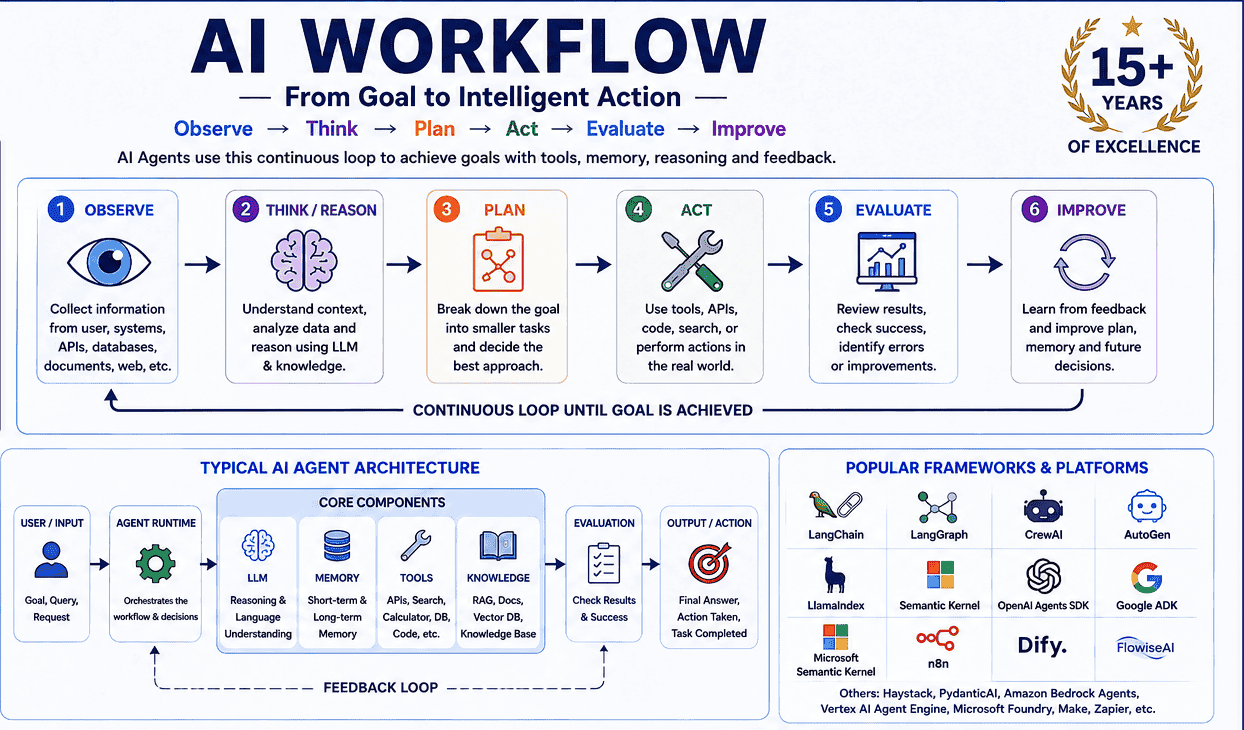
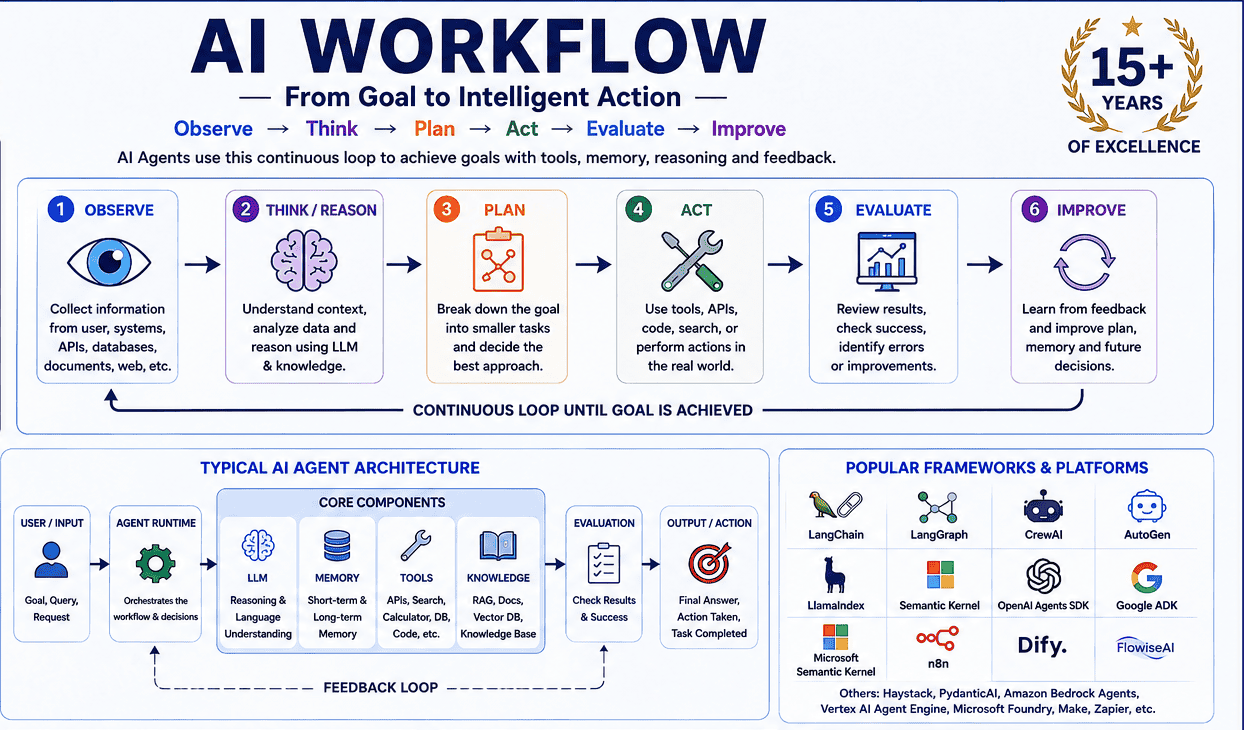
An AI agent is not a chatbot with better prompts. It is an LLM wrapped in a loop — observe, think, plan, act, evaluate, improve — with tools, memory and guardrails. Here is how that loop works, the 12 agent types, and which frameworks to learn first.
An AI agent is not a chatbot with better prompts. It is an LLM wrapped in a loop — observe, think, plan, act, evaluate, improve — with tools, memory and guardrails. Here is how that loop works, the 12 agent types, and which frameworks to learn first.
A chatbot answers. An agent acts.
That one distinction explains most of the confusion around agentic AI. A traditional chatbot takes your prompt, sends it to a large language model and returns text. An AI agent takes a goal, decides what to do about it, calls tools, looks at the results, judges whether it is done, and keeps going until it is — with limited human intervention.
The working definition is worth memorising:
AI Agent = LLM + Instructions + Memory/State + Tools + Reasoning/Planning + Execution Loop
This guide covers what an agent actually is, how the loop works, the twelve agent patterns you will meet in real projects, the difference between an agent and RAG and a workflow, the four ways to build one, the frameworks worth your time, and the order to learn everything in.
What is an AI agent?
An AI agent is a software system that perceives information, reasons about what to do, uses tools, takes actions, observes the results, and continues working toward a goal.
A simple chatbot follows one path:
User Input → LLM → ResponseAn agent follows a dynamic one:
Goal
  ↓
Observe
  ↓
Think / Plan
  ↓
Act / Use Tool
  ↓
Observe Result
  ↓
Evaluate
  ↓
Goal Achieved?
  ├── No → Continue
  └── Yes → Finish
That cycle — Observe → Think → Act → Observe → Think → Act — is the single most important concept in agent development. Everything else is an elaboration of it.
A worked example
Ask an LLM: "Research the best cloud certification for a Python developer and recommend one."
A plain model answers from what it already knows — which may be outdated and cannot be checked.
An agent instead searches for current certification information, collects prices and prerequisites, compares options, analyses relevance to Python work, evaluates what it found, and only then prepares a recommendation. It is not generating text about the task. It is performing the task.
How the loop actually runs
Expanded, a single agent turn looks like this:
Goal → Reason/Plan → Select an Action → Tool (API / DB / Web)
     → Observe Result → Evaluate → Goal met?
                                    ├── No  → loop again
                                    └── Yes → finish
A trivial weather agent, given "Should I carry an umbrella today?", checks the weather, calls a weather API, observes the forecast, reasons about rain probability, and answers. Three of those five steps are impossible for a bare LLM — which is exactly why tools matter.
The core components of an agent
Nearly every production agent is built from some subset of these ten pieces:
| Component | Purpose |
|---|---|
| LLM | Reasoning, language understanding and generation |
| Instructions | Define the agent's role, rules and objectives |
| Tools | Allow interaction with external systems |
| Memory | Store and retrieve useful information |
| State | Track the current task and progress |
| Planning | Break complex goals into smaller tasks |
| Execution | Perform actions |
| Observation | Examine results from tools or the environment |
| Guardrails | Restrict unsafe or unwanted behaviour |
| Evaluation | Determine whether the task actually succeeded |
Structurally:
                 AI AGENT
                    │
       ┌────────────┼────────────┐
       ↓            ↓            ↓
     LLM         Memory        Tools
       │            │            │
       └────────────┼────────────┘
                    ↓
                 Planner
                    ↓
                 Executor
                    ↓
                 Result
Tools are what make it an agent
Tools connect the model to the world: web search, calculator, Python interpreter, database, REST APIs, file system, email, calendar, CRM, cloud services. Without them an LLM can only produce text. With them it can do things — and that is the entire difference.
It also means the hard engineering in agent work is rarely the prompt. It is tool design, error handling, and deciding what the agent is allowed to touch.
The 12 types of AI agents
There is no universal taxonomy — agents get classified by architecture, autonomy, memory, planning style or agent count. These twelve patterns are the ones you will actually encounter.
1. Simple / reactive agent
Input → LLM → Output. No tools, no long-term memory, no multi-step planning. "Explain inheritance in Python" needs nothing more.
2. Tool-using agent
The agent decides when external information is required, calls a tool — search, calculator, database, API, code execution — and folds the result into its answer. This is the first genuinely agentic step.
3. ReAct agent
ReAct = Reason + Act. The loop is Reason → Action → Observation → Reason → Action → Observation → Final Answer. It suits any task where each tool result should change the next decision. Modern systems often keep the reasoning hidden from the user; the architectural idea — reason, act, observe — is what matters.
4. Planning agent
Given "Build a website for a training institute", the agent decomposes the goal: analyse requirements → design database → create UI → build backend → create APIs → write tests → deploy → monitor. Planning pays off for software development, research, data analysis, business workflows and project management.
5. Reflection / self-correcting agent
The agent grades its own output and fixes it: Generate → Evaluate → good? → Fix or Finish. A coding agent writes code, runs tests, reads the failure, analyses the error, modifies the code and re-runs — the same loop a developer runs, automated.
6. Memory-based agent
Short-term memory holds the current conversation. Long-term memory persists across sessions in PostgreSQL, Redis, MongoDB, SQLite or a vector database, and is retrieved when relevant. Memory is what makes an assistant feel continuous rather than amnesiac.
7. RAG agent
RAG = Retrieval-Augmented Generation: Question → search knowledge base → retrieve relevant documents → LLM → answer. It is the standard pattern for company knowledge assistants, HR bots, technical documentation, customer support, legal search and education — anywhere the answer lives in private documents rather than model weights. Our RAG explainer covers the retrieval side in depth.
8. Workflow agent
A fixed business process with AI at chosen stages:
New Student → Collect Details → AI Resume Analysis → Skill Gap Analysis
            → Recommend Course → Send Email → Update CRM
For business automation, a controlled workflow is often more reliable than full autonomy. Do not reach for autonomy when a flowchart will do.
9. Multi-agent system
Several specialised agents cooperate under a manager — research, coding and testing agents feeding a final result. A software delivery system might chain Product Manager → Developer → Code Reviewer → Testing → DevOps agents.
10. Hierarchical agent
A supervisor decides which specialist handles each task. Same idea as above, with explicit delegation rather than peer collaboration.
11. Autonomous agent
The agent receives a goal, not a procedure, and determines its own sequence. The more decisions it makes independently, the more autonomous it is — and the more your guardrails and evaluation matter.
12. Human-in-the-loop agent
For risky actions, the agent stops and asks: Agent Decision → Risk Check → Human Approval → Execute or Stop. Non-negotiable for financial transactions, production deployments, email campaigns, data deletion, legal workflows and security operations.
Agent vs chatbot vs RAG vs workflow
These four get used interchangeably in job descriptions. They are not the same thing:
| System | Main characteristic |
|---|---|
| Chatbot | Responds to conversation |
| LLM application | Uses an LLM for one specific task |
| RAG application | Retrieves external knowledge before answering |
| Workflow | Follows predefined steps |
| AI agent | Dynamically decides its own actions |
| Multi-agent system | Multiple agents collaborate |
Compressed to their shapes:
Chatbot     : Question → Answer
RAG         : Question → Retrieve → Answer
Workflow    : Step 1 → Step 2 → Step 3 → Step 4
AI Agent    : Goal → Decide → Tool → Observe → Decide → Tool → Finish
Multi-Agent : Goal → Specialised Agents → Collaboration → Result
If you can draw which of these five your project needs, you have already avoided the most common architectural mistake in agentic AI — building an autonomous agent where a workflow was the correct answer.
Four ways to build an agent
Approach 1 — build it yourself
Implement the loop directly against an LLM API in Python or JavaScript:
while not goal_completed:

    response = llm.ask(
        messages=messages,
        tools=tools
    )

    if response.requests_tool:
        result = execute_tool(response.tool)
        messages.append(result)
    else:
        return response
Advantages: maximum control, minimal dependencies, highly customisable — and by far the best way to actually understand agents.
Disadvantages: you implement state management, tool execution, error handling, retries, memory, observability, guardrails and evaluation yourself.
Every serious agent developer should write this loop once from scratch before touching a framework. It is twenty lines, and it makes every framework abstraction afterwards obvious.
Approach 2 — use an agent SDK
SDKs give you reusable building blocks for agents, tools, handoffs, guardrails, tracing and orchestration: the OpenAI Agents SDK, Google Agent Development Kit, Microsoft Agent Framework.
Approach 3 — use an agent framework
Higher-level abstractions for agentic applications: LangChain, LangGraph, CrewAI, AutoGen, LlamaIndex, Semantic Kernel, PydanticAI, Haystack.
Approach 4 — no-code / low-code platforms
Visual builders — Microsoft Copilot Studio, n8n, Dify, Flowise, Zapier, Make — assemble agents as workflows:
Gmail → AI Agent → Extract Customer Request → Search Knowledge Base
      → Generate Response → Human Approval → Send Email
Ideal for business automation you need running this week rather than this quarter. Increasingly, "AI automation" roles in Pune expect exactly this skill alongside Python.
Which framework should you learn?
| Framework / platform | Particularly useful for |
|---|---|
| LangChain | General LLM application development |
| LangGraph | Stateful, controllable agent workflows |
| OpenAI Agents SDK | Agents, tools, handoffs, tracing |
| CrewAI | Multi-agent collaboration |
| AutoGen | Multi-agent systems and agent-to-agent interaction |
| Semantic Kernel | C#/.NET/Azure enterprise applications |
| LlamaIndex | RAG and agents over private data |
| Google ADK | Google-oriented agent development |
| PydanticAI | Typed Python AI applications |
| Haystack | Search, RAG and pipelines |
| Amazon Bedrock Agents | AWS-managed agent applications |
| Vertex AI Agent Engine | Google Cloud agent deployment |
| Microsoft Foundry Agent Service | Azure enterprise agent deployment |
LangGraph deserves a special mention. Where a chain is linear (Agent → Agent → Agent), LangGraph models the application as a graph:
             START
               ↓
           Research
            /     \
           ↓       ↓
        Analyze   Search
           \       /
            ↓     ↓
             Review
                ↓
              END
That makes it the practical choice for stateful agents, long-running workflows, human approval steps, branching logic, multi-agent systems and durable execution.
You do not need to master all of them. Learn one deeply, then read the others' docs — the concepts transfer.
A production-grade agent architecture
                    USER
                      ↓
               ┌─────────────┐
               │  Agent/API  │
               └──────┬──────┘
                      ↓
              ┌───────────────┐
              │ Agent Runtime │
              └───────┬───────┘
          ┌───────────┼───────────┐
          ↓           ↓           ↓
       Planning     Memory       Tools
                                  ├── Web
                                  ├── DB
                                  └── API
                      ↓
                     LLM
                      ↓
                 Evaluation
              ┌───────┴───────┐
              ↓               ↓
           Continue          Done
A demo agent stops at the loop. A production agent also needs authentication and authorisation, rate limits, logging, monitoring, cost tracking, retries, timeouts, guardrails, human approval, evaluation and security.
That gap — between a notebook demo and a system a business can actually run — is where the jobs are.
What to learn, in order
Learning one framework is not a skill set. This is the sequence that works:
Level 1 — LLM fundamentals. LLMs, tokens, context windows, prompt engineering, system vs user messages, structured outputs, function/tool calling, embeddings. Start with what a large language model is and advanced prompt engineering techniques.
Level 2 — API development. Python, REST APIs, JSON, HTTP, FastAPI, authentication, async programming. Agents are backend systems; if you cannot build and secure an API, you cannot ship an agent. Our Python course in Pune covers this base.
Level 3 — RAG. Embeddings, document chunking, vector search, metadata filtering, reranking, vector databases, retrieval pipelines.
Level 4 — agents. Tool calling, agent loops, ReAct, planning, state, memory, reflection, guardrails, human-in-the-loop.
Level 5 — frameworks. A practical order: LangChain → LangGraph → OpenAI Agents SDK, then explore CrewAI, AutoGen, LlamaIndex, Semantic Kernel or Google ADK as your projects demand.
Advanced agent engineering
Once the fundamentals hold, these are the topics that separate a hobby project from a production system:
- Orchestration — coordinating several agents through a defined sequence.
- Parallel execution — running independent sub-tasks simultaneously under a manager, then merging results.
- Stateful execution — the agent knows exactly where it is in a workflow.
- Durable execution — a failed long-running process resumes from its last checkpoint instead of restarting from task one.
- Observability — visibility into token usage, latency, tool calls, errors, cost, workflow state and success rate.
- Evaluation — testing against realistic tasks for accuracy, tool selection, tool arguments, task completion, safety, latency, cost and failure recovery.
- Guardrails —
User Request → Safety Check → Agent → Permission Check → Tool, with human approval on anything sensitive.
Evaluation is the most-skipped item on that list and the most valuable one in an interview. "How do you know your agent works?" separates people who have shipped from people who have watched tutorials.
Three levels of agent maturity
Level 1 — Basic agent: LLM + Tools + Agent Loop. Example: a web research agent.
Level 2 — Production agent: LLM + Tools + RAG + Memory + State + Guardrails + Evaluation + Observability. Example: a customer support agent.
Level 3 — Agentic system: a manager coordinating research, coding and customer agents, with human approval before anything touches production systems. Example: an autonomous software-delivery platform with specialised research, coding, testing, review and deployment agents.
Most learners aim straight for Level 3 and produce something that demos well and fails in week two. Build a solid Level 1, harden it into Level 2, and you will be ahead of most candidates.
A suggested learning path
Python
  ↓
LLM APIs
  ↓
Prompt Engineering
  ↓
Tool / Function Calling
  ↓
RAG
  ↓
Build a Simple Agent Yourself
  ↓
LangChain
  ↓
LangGraph
  ↓
OpenAI Agents SDK
  ↓
Multi-Agent Systems
  ↓
MCP / External Tools
  ↓
Evaluation + Guardrails
  ↓
Observability
  ↓
Production Deployment
If you are assembling a portfolio around this, how to build an AI portfolio that gets interview calls covers what to build and how to present it.
Key takeaways
- An AI agent is more than an LLM call.
- The core is the goal → decide → act → observe → repeat loop.
- Tools — APIs, databases, browsers, code execution — are what turn generation into action.
- Memory and state let agents hold context and progress.
- RAG gives agents access to private or current knowledge.
- Planning decomposes complex goals; reflection improves the output.
- Multi-agent systems divide work among specialists.
- Human-in-the-loop is mandatory for high-risk actions.
- Frameworks help, but you should be able to write the loop yourself.
- No-code platforms are legitimate tools for business automation.
- Production agents need security, observability, evaluation, guardrails, reliability and cost management.
Frequently asked questions
What is the difference between an AI agent and a chatbot?
A chatbot maps input to a response. An agent takes a goal, decides its own actions, calls tools, observes results and loops until the goal is met. The loop and the tools are the difference.
Do I need to know Python to build AI agents?
Practically, yes. The ecosystem — LangChain, LangGraph, LlamaIndex, CrewAI, the OpenAI Agents SDK — is Python-first, and you also need REST APIs, JSON and async work. C#/.NET developers have a genuine alternative in Semantic Kernel, and no-code platforms need no programming at all, but Python remains the default path.
Is RAG an AI agent?
No. RAG is a retrieval pattern: retrieve, then generate. It becomes part of an agent when the agent decides when to retrieve, what to do with the result, and what action to take next.
Which framework should a beginner start with?
Build a bare loop yourself first, then LangChain for the fundamentals, then LangGraph once you need state, branching or human approval. Adding CrewAI or AutoGen makes sense only when you genuinely need multiple cooperating agents.
How long does it take to become an AI agent developer?
With Python already in hand, roughly 3–4 months of focused work covers LLM fundamentals, RAG, the agent loop and one or two frameworks, plus a portfolio project. Starting from zero programming, plan 6–8 months.
Are AI agent skills in demand in Pune?
Yes, and increasingly so. Pune product companies and GCC captives are hiring for RAG systems, internal copilots and workflow automation, while services firms are building agent practices for clients. The roles ask for Python, APIs, vector databases, one agent framework, and — most tellingly — evaluation and guardrails.
Bottom line
AI agents represent a shift from systems that generate responses to systems that pursue goals and perform actions.
A chatbot answers "What is the weather today?". An agent handles "Check today's weather, look at my calendar, recommend what I should do, and add the selected activity to my calendar." — and the difference comes entirely from combining an LLM with instructions, tools, memory and state, planning, execution and evaluation.
Do not start by memorising frameworks. Understand the agent loop, tool calling, state, memory, RAG, planning and evaluation first — then pick the framework that matches what you want to build. The long-term goal is not to use an agent framework. It is to design reliable, secure, observable and useful agentic systems.
Want to build this properly? Archer Infotech's Agentic AI course in Pune is a 2-month track covering LangChain and LangGraph, the OpenAI Assistants API, Claude tool use, the ReAct pattern, memory and state management, multi-agent orchestration, and observability and deployment for real agent systems. If you need the ground floor first, start with Generative AI training or our full GenAI course range. Talk to our team about which entry point fits your background.
Pune IT careers — monthly briefing
One email a month with the most actionable Pune IT hiring + salary updates. Free.
One email per month. No spam. Unsubscribe anytime.